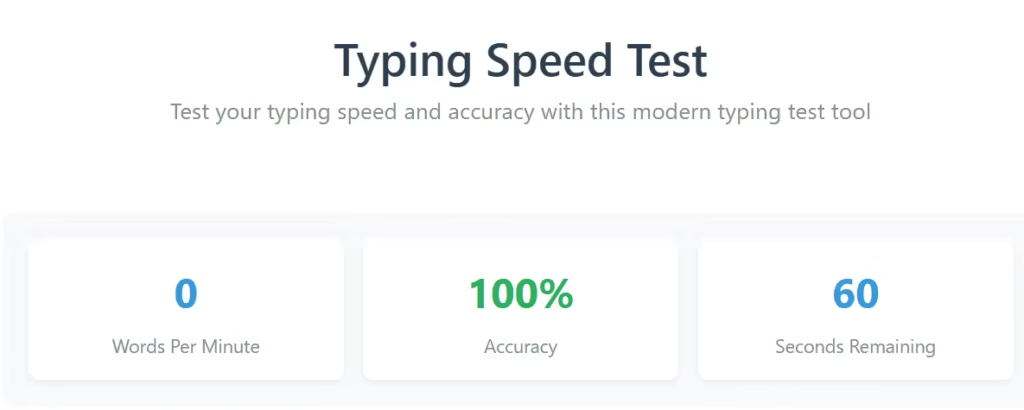
Typing Speed Test
Typing Test Tool – Quick Start Guide
How to Use This Tool
1. Start the Test
- Click the “Start Test” button
- OR simply start typing in the input box
- The 60-second timer will begin automatically
2. Type the Text
- Type the text shown in the display area exactly as you see it
- The current word is highlighted in blue
- Correct letters appear in green
- Incorrect letters show in red with underline
3. Move to Next Word
- Press the SPACEBAR after completing each word
- The tool will automatically advance to the next word
- Don’t worry about capitalization – it’s not required
4. Complete the Test
- Continue typing until the timer reaches 0 seconds
- Your results will be displayed automatically
- Click “Try Again” to start a new test
Understanding Your Results
- WPM: Words Per Minute (higher is better)
- Accuracy: Percentage of correct characters
- Words Typed: Total words completed
Tips for Better Results
- Focus on accuracy over speed
- Use all fingers for typing
- Maintain good posture
- Practice regularly with different texts
Controls
- Start Test: Begin 60-second timer
- Reset: Stop and restart current test
- Try Again: Start new test after completion
📌 Typing Test Tool – Complete Overview
The Typing Test Tool is a fast, accurate, and user-friendly online utility designed to help users measure their typing speed, accuracy, consistency, and overall keyboard efficiency. Whether you’re a student, job seeker, content writer, or professional typist, this tool offers a smooth typing experience combined with real-time analytics to track your performance and improve over time.
Typing speed has become an essential skill in today’s digital world. From office work and coding to chatting and content creation, fast and accurate typing can significantly improve productivity. The Typing Test Tool empowers you to practice and monitor your progress with simple, distraction-free UI and smart performance indicators.
This tool includes real-time word highlighting, accuracy monitoring, correct/incorrect letter indicators, auto word-jumping, and a smart WPM calculator. It is built for beginners and professionals alike, offering a customizable and highly responsive typing environment that works smoothly on desktop, tablet, and mobile.
The Typing Test Tool uses a 60-second fixed timer, automatically starts when you begin typing, and instantly displays your performance metrics. The assessment includes Words Per Minute (WPM), Accuracy Percentage, and Correct/Incorrect words typed. Users can retake the test endlessly to track progress and master typing speed.
Whether you want to practice for a job interview, prepare for a professional typing exam, train for a data entry test, or simply improve your general typing skills, the Typing Test Tool is the ideal choice.
✨ Key Features of the Typing Test Tool
Below are the major highlights and features that make this Typing Test Tool powerful, user-friendly, and perfect for all skill levels.
1. One-Click Start Test
You can begin the test instantly by clicking the Start Test button.
You can also simply start typing in the input field, and the 60-second countdown automatically begins. This makes usage easy and intuitive.
2. 60-Second Timer
The Typing Test Tool uses a standard 1-minute timer, widely used in professional typing exams.
The timer ensures consistency and provides a reliable snapshot of your typing speed.
3. Real-Time Word Highlighting
The current word you need to type is highlighted in blue.
This reduces confusion, improves focus, and helps you keep track of your position in the paragraph.
4. Smart Letter Coloring
To help you see mistakes instantly:
- Correct letters appear in green
- Incorrect letters appear in red with underline
- Helps you stay aware of errors and develop accuracy
- Avoids looking back and rechecking your text manually
This feature is especially beneficial for beginners.
5. Auto Word Navigation
After typing a word, simply press the spacebar and the tool automatically jumps to the next word.
You do not need to manually click anywhere or reposition the cursor.
6. Case-Insensitive Typing
The tool does not require capitalization, making typing easier and more fluid.
You can focus on speed and accuracy instead of worrying about uppercase or lowercase letters.
7. Complete Test Automation
Once the timer reaches 0 seconds, the test ends automatically.
Your results panel pops up instantly showing:
- Words Per Minute (WPM)
- Accuracy Percentage
- Total Words Typed
- Correct / Incorrect Count
8. Detailed Performance Results
Performance data is clearly displayed to give users full insight into their typing level:
✔ WPM – Words Per Minute
Shows typing speed per minute.
✔ Accuracy (%)
Measures character correctness.
✔ Words Typed
Total number of completed words.
This makes the tool ideal for professional assessments.
9. Reset and Try Again Buttons
- Reset: Stops the test in the middle and restarts.
- Try Again: Starts a fresh session after completion.
This makes repeated practice convenient and fast.
10. Clean and Modern UI
The tool is designed with:
- Minimalistic layout
- Clear typography
- Smooth animations
- Highly responsive design
- No distracting elements
This ensures a professional and enjoyable typing experience.
11. Mobile & Tablet Responsive
Works perfectly on:
- Laptops
- Desktops
- Smartphones
- Tablets
Users can practice typing anywhere, anytime.
12. Error-Free User Experience
The tool ensures:
- No page reloads
- No lag
- Smooth performance
- Accurate measurement
This makes it ideal even for exam or job test preparation.
13. Beginner-Friendly Tips Section
A built-in guide educates users about:
- How the test works
- How to improve accuracy
- Proper typing posture
- Techniques to build speed
14. Perfect for Job & Exam Preparation
The Typing Test Tool is suitable for:
- Government typing tests
- Bank exams
- Office assistant typing tests
- Data entry operator recruitment
- Call center & transcription jobs
15. Free to Use
The tool is completely free and can be used unlimited times without login or registration.
📌 Tips for Improving Typing Speed
The Typing Test Tool also includes a practical tips section:
- Focus on accuracy first, speed will increase naturally
- Avoid looking at the keyboard
- Use all ten fingers
- Maintain good posture
- Practice daily to improve muscle memory
- Try different types of paragraphs
Consistent practice will significantly improve your typing skills.
❓ Frequently Asked Questions (FAQ)
Below is a detailed FAQ section for your Typing Test Tool website.
1. What is a Typing Test Tool?
A Typing Test Tool is an online application that measures how fast and accurately you can type within a specific time limit—usually one minute. It calculates your Words Per Minute (WPM) and Accuracy Percentage.
2. How does the 60-second typing test work?
When you click Start Test or begin typing, the 60-second timer starts automatically. You must type the text shown on the screen as accurately and quickly as possible before the timer finishes.
3. Do I need to match uppercase or lowercase letters?
No. The Typing Test Tool is case-insensitive, meaning you don’t need to worry about capitalization.
4. How is WPM calculated?
WPM (Words Per Minute) is calculated using the formula:
1 word = 5 characters, including spaces.
The more characters typed correctly within 60 seconds, the higher your WPM.
5. What does accuracy mean?
Accuracy measures how many characters you typed correctly compared to the total characters typed.
A high accuracy percentage means fewer mistakes.
6. Can I use the tool on mobile or tablet?
Yes. The Typing Test Tool is fully responsive and works smoothly on smartphones, tablets, and desktop devices.
7. Can I restart the test anytime?
Yes. You can use:
- Reset button to restart during the test
- Try Again button to take a new test after completion
8. Why does the current word highlight in blue?
The highlighted word helps you stay focused and know exactly which word to type next, improving accuracy and speed.
9. What do green and red letters mean while typing?
- Green letters = correct typing
- Red letters with underline = incorrect typing
This instant feedback helps you improve real-time accuracy.
10. Is this tool suitable for job typing test preparation?
Absolutely. This tool is perfect for preparing for:
- Government typing exams
- SSC, Banking & Railway jobs
- Data entry operator exams
- Office assistant jobs
- Typing practice for professionals
11. Is the tool free to use?
Yes, the Typing Test Tool is 100% free with unlimited usage.
12. How can I increase my typing speed?
To increase your speed:
- Practice daily
- Avoid looking at the keyboard
- Improve finger placement
- Maintain posture
- Focus on accuracy first
Speed increases naturally with practice.
13. Can I pause the typing test?
No. To ensure fairness and accuracy, the test cannot be paused.
However, you can restart at any time.
14. Why does the test end automatically?
To ensure integrity and consistency, the tool automatically ends at 0 seconds and displays your results instantly.
15. Is internet required?
Yes, you need an active internet connection to use the tool online.
🎯 Final Thoughts
The Typing Test Tool is a modern, responsive, and highly efficient typing practice tool created for everyone—from absolute beginners to professional typists. Packed with real-time feedback, precision measurement, and a user-friendly interface, it helps users improve their typing speed, accuracy, and confidence.
With a clean design, instant results, progress tracking, and unlimited usage, this tool becomes an essential companion for daily typing practice, skill development, and exam preparation.
GST Calculator
Tools